My mother was left completely lost. She had no idea where my father had kept their bank accounts, shares, will, or savings. Nothing. The man who had always taken care of everything was gone, and with him went the knowledge of where their entire financial life was stored.
KeepsVault · A calmer way to be prepared
Scroll the story
Your life's important things, safe today — in the right hands tomorrow.
Keep passwords, documents, wishes and instructions together. Share only what each person needs, now or later.
KeepsVault is in development. We will open public sign-up as soon as the full service on this page is ready.
Your protected content is encrypted before upload
You choose what each person receives
Receiving stays free
01 · The reason
How it all began
In 2004, my world changed forever when my father passed away. In the midst of grief, I discovered something that would haunt me for years to come.
I watched helplessly as she struggled to piece together their financial picture, calling banks, searching through old papers, and facing the harsh reality that she was completely unprepared for this moment.
Why I built KeepsVault
I couldn't let other families go through what mine did. But I also realized something deeper - we all live with constant, low-level stress about the things we're supposed to remember but keep forgetting.
Why it matters
76% of 14,631 Which? members surveyed had no plan for their digital assets after death.*
Bank logins on scraps of paper. Policies nobody can find. Wishes that never reach the right person. When life changes suddenly, families lose months untangling it.
*Which? Connect panel survey, April 2024.
02 · See it in action
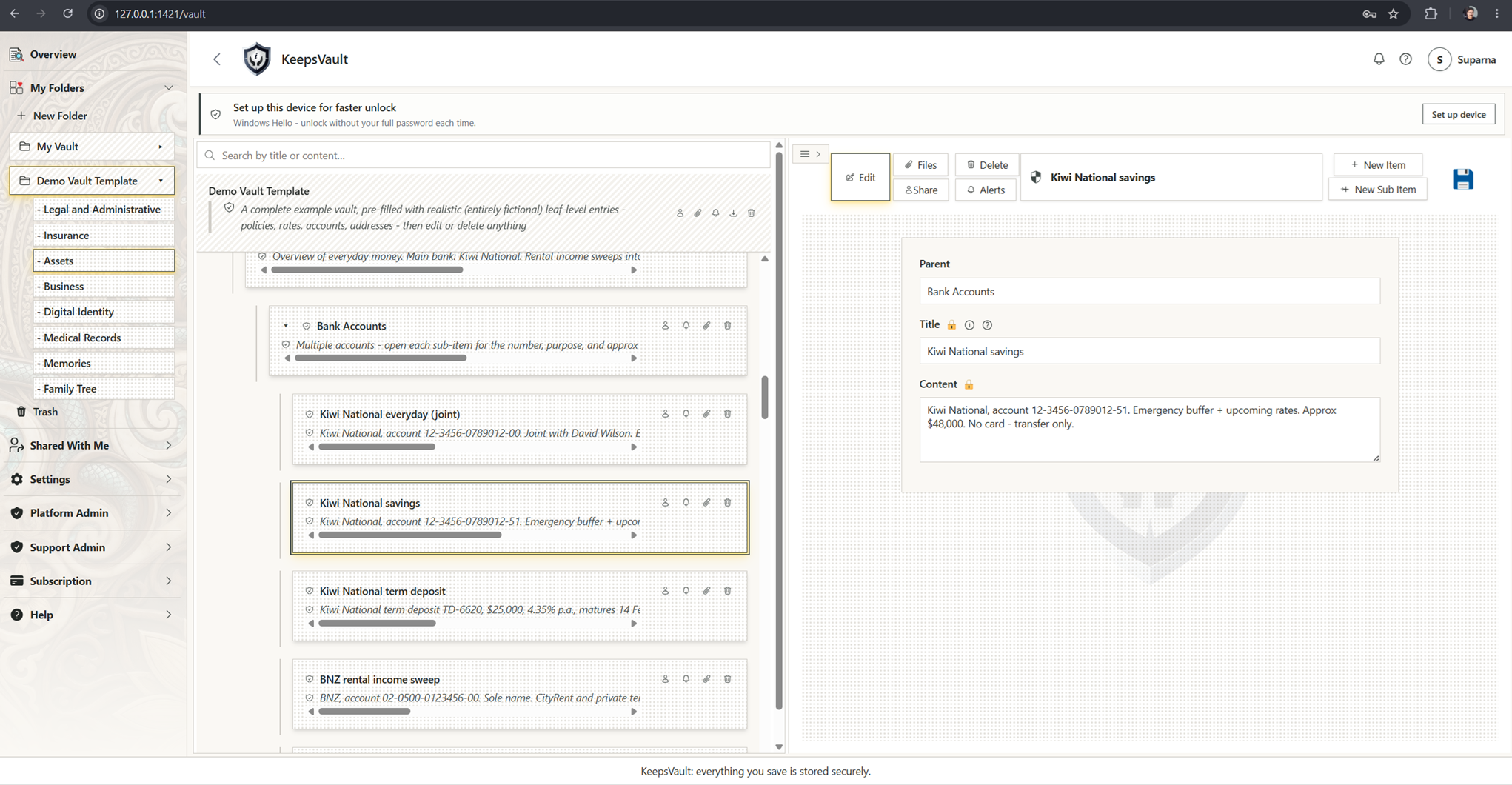
A real vault, not a mock-up.
This is the actual product - organise folders like Legal & Administrative, Insurance and Assets, and share each one on your terms.
Plain language
One item at a time
Ready when needed
How it works
Set it up step by step. Keep it useful as life changes.
Put things in the vault
Type or upload - item titles and contents, folder descriptions and files are encrypted on your device before they leave your browser.
Choose your people
Decide who sees what, now or later. They receive a simple invitation.
Live your life
Use the vault every day for logins and documents. Your sharing plan stays ready, and you can change it any time.
One place for the full picture
Life is more than a list of passwords.
A password may open an account. It does not explain why the account matters, where the documents are, or what you wanted someone to do. KeepsVault keeps the information and the instructions together.
Accounts and access
Keep important login details and the instructions that explain them.
Documents and records
Keep IDs, policies, property records, legal documents and other files together.
Wishes and instructions
Write down what matters, who should know and what you would like them to do.
Dates and reminders
Get a reminder before a passport, policy, agreement or instruction needs attention.
These are examples of what you can keep. KeepsVault stores what you put in it and does not check, validate or approve your documents.
Built for a different job
Not just a password. Not just a folder.
Password managers help people sign in. Cloud storage keeps files. KeepsVault helps organise the information people may need and lets you decide who receives each part.
Password manager
Saves logins and can fill them into websites and apps.
Cloud storage
Stores and synchronises files and folders.
KeepsVault
Keeps information, documents and instructions together, reminds you when something needs attention, and lets you choose what each person can receive.
KeepsVault can store passwords, but it does not fill them into websites. It can store files, but it is not a replacement for general file collaboration.
03 · Your people, your rules
One vault. Different people. Only what you choose.
Your partner may need account details. Your lawyer may need a will. Your family may need instructions. Each person sees only the part you share.
 Margaret's vaultProtected before upload
DDavidBanking details
EExecutorWill and instructions
MMiaFamily memories
Share now
Share an item, folder or branch with someone who already uses KeepsVault.
Share before they join
Choose their email address now. They can create and secure their account later without asking you to share everything again.
Arrange access for later
Choose selected information for an inactivity release. KeepsVault warns you and allows a further grace period first.
Stay in control
Change or remove access before a pending release has completed.
04 · Security, honestly
Strong protection. Honest boundaries.
The contents inside your items, folder notes and files are encrypted on your device before upload. KeepsVault still needs some ordinary details to run the service, such as folder names, file names, dates and who you share with.
Before it is sent
Protected before upload
The contents inside your items, folder notes and files are protected before they are sent.
Nothing extra
Only the part you share
A recipient receives access to the item, folder or branch you selected, not the rest of the vault.
The honest boundary
What KeepsVault still needs to see
Account details, folder names, file names and sizes, dates and sharing details are needed to run the service.
Sharing before they join
A separate process for later access
Sharing with somebody who has not joined uses a controlled holding and release process. The Security details below explain how it works.
A quieter everyday
How it transforms daily life
Imagine waking up each morning knowing exactly what needs your attention today. Not because you're stressed about forgetting something, but because you have a gentle, reliable system that's got your back.
For people and the professionals they trust
Share the right information, not the whole vault.
A lawyer, health professional, accountant, adviser, trustee or care provider may need a few important records, not your whole digital life. KeepsVault lets you share only the relevant items.
Legal and estate work
Share a digital asset list, selected documents and instructions.
Health and care
Share care wishes, insurance information and supporting documents you choose.
Accounting and advice
Share selected identity, account and supporting records.
KeepsVault provides the protected way to store and share information. It does not give professional advice, validate legal documents, act as an executor, replace an official clinical or client record, or provide emergency communication. Each professional remains responsible for consent, advice, decisions, records, retention and legal duties.
05 · Pricing
Simple plans. You pay for your own vault.
Receiving is free. Shared items use your storage only if you save a copy to your vault.
Start with a 90-day trial of Basic. No card required.
Receive, view, download and export information while the share or release remains available. Your own paid plan is not required.
- No charge to receive shared or released information
- Received information does not use your storage
- Access still follows the owner’s sharing choice and the expiry shown. It does not depend on keeping a paid plan.
- Choose a paid plan to save an independent copy or build your own vault
Your own full vault with 5 GB for files.
- Every personal-vault feature
- 5 GB for files
- Share now or arrange access for later
- Reminders before something needs attention
The same full features with 10 GB for files.
- Every personal-vault feature
- 10 GB for files
- For larger document and photo collections
- The same sharing and later-access controls
The same full features with 200 GB for files.
- Every personal-vault feature
- 200 GB for files
- For large photo and document archives
Generous download and export access is included for normal personal use. Reasonable safeguards may apply to unusually high-volume, automated or abusive downloading.
For teams and organisations
Talk to us about work sign-in, staff roles, recovery, who owns work information, and what happens when somebody leaves.
Talk to usLaunch prices are shown in US dollars. Prices, limits and retention periods may change before public sign-up. Final terms will be shown before you create an account.
Your information is not deleted just because a plan changes.
Payment, inactivity and verified death are three separate things. Each has a different job.
If a trial or paid plan ends
Your own vault remains readable and exportable. New files and new items you add pause until you choose a plan that lets you add content. Unless you reactivate first, the ordinary retention period is 12 months.
If your files exceed a smaller plan
Existing files remain available. New uploads pause until you reduce storage or move to a larger plan. Nothing is deleted merely to fit a smaller plan.
Things shared with you
Receiving stays free while the share or release remains available. Unsaved received information uses no storage and shows its expiry. Saving an independent copy requires a plan that lets you add to your own vault.
Inactivity release
Inactivity is not treated as proof of death. Choose 60 to 365 days, with 90 days as the default. KeepsVault warns the owner and allows a further 7 to 14 days before releasing only the content they selected.
Verified death
Death verification is a separate support process. It is not inferred from inactivity or a stopped payment. Once verified, relevant shared or released content is kept for five years from verification.
Questions
Asked and answered.
Everyday questions
What is KeepsVault?
KeepsVault is an online vault for important information people may need during your life or later. It keeps passwords, documents, wishes and instructions together and lets you choose who can receive each part.
Can KeepsVault see my passwords or documents?
Not your protected content. Item titles and contents, folder descriptions and attachment contents are encrypted on your device before upload. KeepsVault still needs ordinary operating details, including folder names, file names and sizes, dates and sharing relationships. Sharing before somebody joins uses a separate controlled process, explained in the Security details below.
Is KeepsVault a password manager?
Not in the usual sense. You can keep passwords in KeepsVault, but it does not fill them into websites. KeepsVault also holds documents, instructions, reminders and sharing choices.
How is KeepsVault different from cloud storage?
Cloud storage mainly keeps files and folders. KeepsVault also helps explain what information means, reminds you when it needs attention and lets you choose who can receive each item or branch.
Can I share with somebody before they join?
Yes. Choose their email address first. They can create and secure their account later without asking you to share everything again.
Do recipients have to pay?
No. A recipient can receive, view, download and export what was shared or released without buying a plan.
Can I use KeepsVault while I am alive and well?
Yes. KeepsVault is designed for everyday use. Keep documents and account details together, receive reminders and update information when life changes.
What happens if I stop paying?
Your own vault becomes read-only and exportable. New files and new items you add pause. Receiving information shared by somebody else remains free while that share or release remains available.
If I do not sign in, will KeepsVault think I have died?
No. Inactivity and verified death are separate. An inactivity release follows the timing you chose, warns you and allows a further grace period.
What if I forget my password?
KeepsVault supports Recovery words and Another authorised device. Company recovery may also be available where the company has set it up. The available choices are explained when the account is secured.
How does a family member report a death?
Contact support to start the process. Sensitive evidence is submitted through KeepsVault’s secure in-product process. Do not send sensitive documents as ordinary email attachments. KeepsVault checks the release requirements but does not decide who is legally entitled.
How long is verified legacy content kept?
Five years from death verification for relevant shared or released content.
How do I keep something shared with me?
To keep your own independent copy, choose a plan that lets you add content to your vault, then use Save to my vault. The copy uses your storage and follows your plan.
What happens if the owner comes back?
A confirmed check-in before release cancels the inactivity trigger. Information already released cannot automatically be taken back.
Do I need to install anything?
No. There is nothing to download and nothing to update. You open KeepsVault in your browser on any supported device.
For professionals
Can lawyers and estate-planning professionals use KeepsVault?
Yes. A person can build a digital asset inventory for estate planning and share selected information with a lawyer or adviser. KeepsVault provides protected information sharing. It does not give legal advice, draft or validate wills, act as an executor or decide legal entitlement.
Can health and care professionals use KeepsVault?
Yes, for information a person chooses to share, such as care wishes, insurance details or supporting documents. KeepsVault is not a clinical record system, diagnostic service, treatment service or emergency communication channel.
Can accountants, advisers, trustees or insurers use KeepsVault?
Yes, for secure client document sharing when the person chooses the records. KeepsVault does not provide accounting, tax, insurance, investment or financial advice and does not confirm that information is complete or accurate.
Does KeepsVault replace a professional’s own system or duties?
No. Each professional remains responsible for consent, advice, decisions, official records, retention, evidence handling and legal or regulatory duties.
Is KeepsVault a legal, medical or financial service?
No. KeepsVault is software for organising, protecting and sharing information. It does not provide the professional advice or make the professional decision.
Security details
What exactly is encrypted?
The protected contents inside your vault are encrypted on your device before they are sent.
Folder names, file names and sizes, dates, account details and sharing relationships remain available to the service so it can operate.
Technical detail
Item titles and contents, folder descriptions and attachment contents use AES-256-GCM encryption in the browser before upload. KeepsVault stores the encrypted form and wrapped keys.
Does this mean the vault exists only on my device?
No. KeepsVault is an online service. The protected contents are encrypted before upload and the encrypted form is stored online.
Technical detail
KeepsVault is not a client-side vault. Encryption occurs in the browser, but the product also uses backend services, a database and online storage.
Is KeepsVault a zero-knowledge digital vault?
The normal vault and direct sharing to an active recipient use zero-knowledge protection for protected content. Sharing before somebody joins uses a separate exception.
Operational metadata remains visible to the service, and the later-access path is not pure zero knowledge.
Technical detail
Direct sharing wraps the content key to the recipient’s public key. KeepsVault stores an encrypted copy of the recipient’s private key, not a readable copy; in the normal personal-vault path KeepsVault does not hold the user-controlled material needed to unlock it. Sharing before somebody joins uses an AWS KMS-backed escrow-assisted release path, which is not pure zero knowledge.
How does direct encrypted sharing work?
When the recipient already has a secured KeepsVault account, the shared content is protected specifically for them.
Technical detail
The owner wraps the content key to the recipient’s public key. The backend stores encrypted content and the recipient-specific wrapped key. This is end-to-end encrypted sharing, scoped to an active recipient whose private key stays protected by their own account.
How is information protected for somebody who has not joined?
KeepsVault keeps a protected release package until the recipient creates and secures an account or another authorised release condition completes.
Technical detail
This is an escrow-assisted path, separate from direct zero-knowledge sharing. The release package is prepared while the owner has full access. At release, the policy, recipient identity and recipient’s current signed public-key bundle are checked, and the content key is wrapped to that recipient’s key. A plaintext content key is not returned in an HTTP response, written to a database or audit row, or written to a log.
What does AWS Key Management Service protect?
AWS Key Management Service protects the highest-level key used by the later-access process.
AWS KMS does not directly encrypt every KeepsVault file. It protects the highest-level key custody for the release-authority path.
Technical detail
A dedicated KMS key protects per-owner release-authority material. AWS KMS key material does not leave the KMS hardware-security boundary in plaintext.
Does AWS KMS make later sharing zero knowledge?
No.
Technical detail
KMS improves the custody of the highest-level release key. The controlled release operation may still handle a plaintext content key briefly while wrapping it to the recipient. KMS does not change the escrow-assisted path into pure zero knowledge.
Does my password go to KeepsVault?
The password itself is not sent to KeepsVault during registration or sign-in.
This does not make weak passwords safe and does not make the whole service impossible to attack.
Technical detail
KeepsVault uses OPAQUE, an augmented password-authenticated key exchange. The device proves knowledge of the password without disclosing the password to the server, and the server stores an OPAQUE registration record rather than a conventional password hash.
Are the audit logs tamper-proof?
No. Tamper-proof would be a stronger claim than the current controls support. The accurate words are integrity-validated and tamper-evident.
Technical detail
KeepsVault records application security and release activity in its application audit history. AWS infrastructure activity is recorded separately through CloudTrail. CloudTrail log-file integrity validation uses hashes, signed digest files and a digest chain to help detect modification or deletion after delivery.
Does KeepsVault provide a cryptographic chain of custody?
No. KeepsVault records security and release activity, but it does not claim a court-certified or legally complete chain of custody.
Technical detail
CloudTrail integrity validation helps detect changes to AWS activity records. That is not the same as a complete evidence-handling process with collection procedures, evidence controls, trusted timestamps and jurisdiction-specific legal requirements. A professional who requires formal evidential handling must use their own process.
Can a database record be changed or deleted?
Yes. Authorised systems and administrators can change or delete records in controlled circumstances. KeepsVault relies on access controls, audit history, and backup and recovery controls rather than claiming that change is physically impossible.
Technical detail
Prevention, detection and recovery are different controls. Access controls limit changes. Application audit history and CloudTrail support investigation. Backup and recovery controls help restore service or data after failure or accidental loss. None of these controls alone means tamper-proof.
How do inactivity and verified death differ?
Inactivity is not proof that somebody has died.
Technical detail
KeepsVault uses confirmed-alive events rather than treating passive background activity as proof that the owner is present. The owner is warned and a grace period applies. Verified death is a separate process and can require supporting evidence and review.
Technical sources
 06 · Your next chapter
Be first in the vault.
Join the waitlist for an early-access invitation. No card and no payment.
No spam. One email when your invitation is ready.